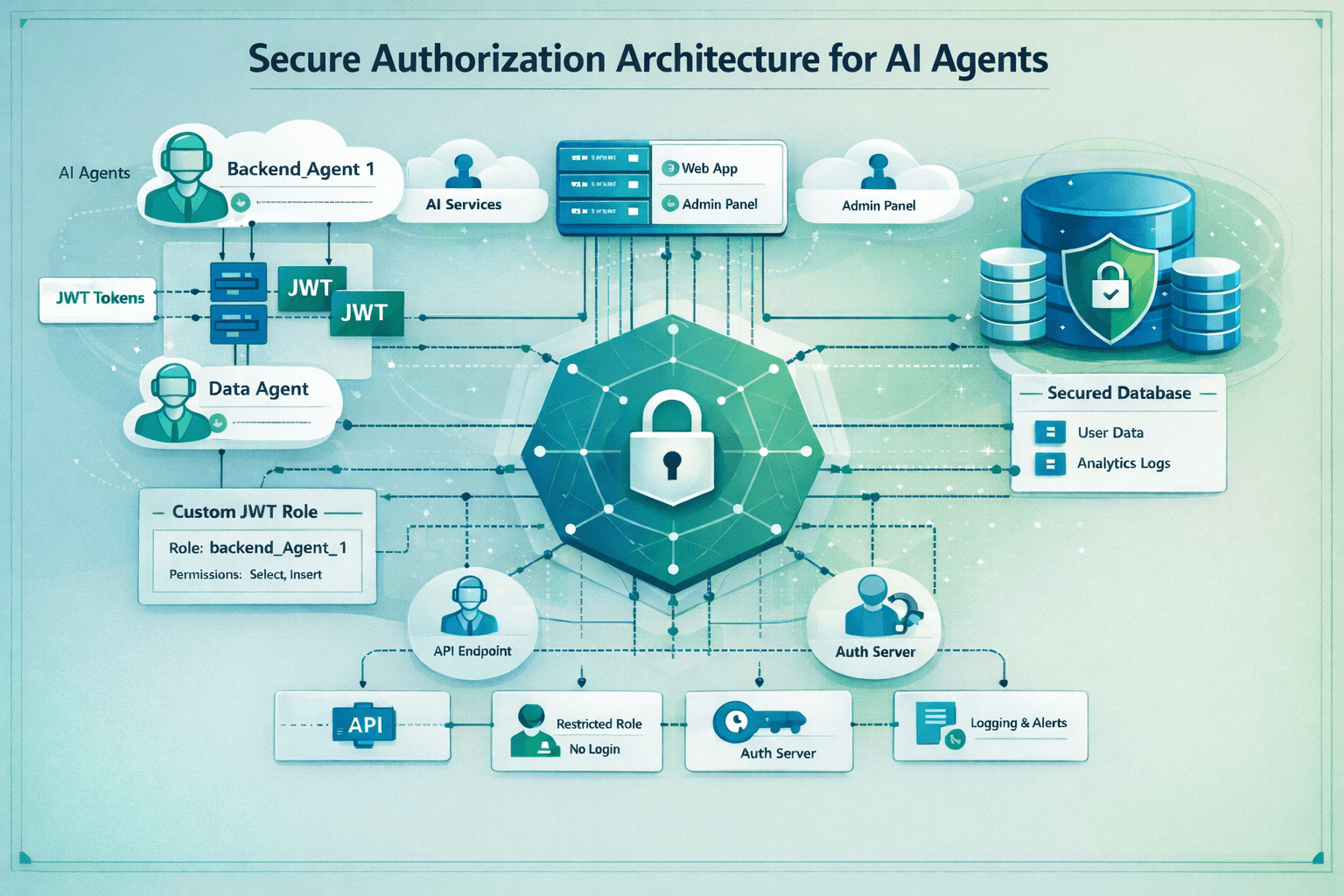
Introduction
Supabase has become one of the most popular backend-as-a-service platforms. It ships with solid defaults and enables fast go to market for a wide range of applications. The primary focus is on removing the burden of database and backend infrastructure management, which it does well for basic web applications. However, as applications grow in functionality, they often require backend services to support the application's features. Enabling such in a secure way is not always straightforward. However, with AI agents increasingly driving such backend components, a secure setup is ever more important.
This guide walks through implementing a robust, least-privilege authentication setup for your backend services, complete with code snippets you can use immediately.
The Problem
Authentication vs Authorization
Authentication is the process of verifying the identity of a user or service. Authorization is the process of granting access to resources based on the identity of the user or service.
While Supabase offers a very convenient and robust authentication system, authorization is largely left to the application developer. With much focus lying on getting applications off the ground quickly, secure architecture choices are often overlooked.
An example of this is the Moltbook breach, which exposed the supabase database to the public, including 35'000 emails and 1.5M API keys [1]. This incident could easily have been prevented by following documented best practices and implementing row level security (RLS) policies. However, there are further challenges lurking in the background when it comes to secure defaults for authorization.
Service Authorization
Row Level Security (RLS) is a feature that allows you to control access to rows in a table based on the identity of the user or service. It is considered the gold standard for authorization in backends, because it can guarantee access control even in scenarios where a backend server component is compromised. Supabase controls access to database information with per user and per row granularity. As such, Supabase offers an invaluable feature to implement strong least privilege principles.
Unfortunately, the default approach for service authorization is quite less secure. By default, Supabase uses API secret keys (formerly known as service role key) to authenticate services. Supabase has introduced several improvements through 2025, including asymmetric cryptography and the support for multiple keys to improve on several key handling challenges [2]. However, a critical shortcoming remains: each secret key grants full access to the database, bypassing all RLS policies.
Inadequate Blast Radius
This is highly problematic, because a single compromised service component immediately results in a full database breach. Imagine for example a web application that has one miniature feature of displaying daily weather information. To implement this feature, the application fetches weather information on a regular basis and stores it in the database. There is no conceivable reason to grant full access to the database, including all user data, to this microservice.
The Solution
Least Privilege Service Authorization
Instead of relying on all-powerful secret API keys, we use Supabase's existing authentication system to sign identity tokens for our services. We then create respective database roles with the least privileges necessary to perform their tasks.
1. Generate Your Own Keys
Supabase used to give you access to the JWT signing key - but with the move to asymmetric cryptography, this is no longer the case. You can, however, generate your own signing key and upload it to Supabase. Creating your own signing keys is straightforward using the Supabase CLI:
1supabase gen signing-key --algorithm ES256This generates an ES256 (ECDSA with SHA-256) key pair that you'll use to sign JWTs for your backend services.
⚠️ Critical: These keys are highly sensitive, as they can sign for any role in the database. Treat them accordingly.
2. Upload Keys to Supabase
For local development, you can keep the keys local and configure Supabase to use them by adding this to your supabase/config.toml:
1[auth]2signing_keys_path = "./signing_keys.json"For cloud-managed Supabase, navigate to your project's authentication settings in the web UI and upload the private key directly.
3. Mint Your Own JWTs
With your signing keys in place, you can now create JWTs for your backend services:
1supabase gen bearer-jwt --role backend_agent_1 --sub 00000000-0000-0000-0000-000000000001 --valid-for 2400hThe main arguments in brief:
--role backend_agent_1: The database role this token will assume--sub: A unique identifier for this service (using a UUID format)--valid-for 2400h: Token validity (100 days in this example)
Rotation considerations: For production environments, consider implementing automated token rotation via GitHub Actions or similar CI/CD workflows, allowing for frequent rotations.
4. Create Database User with Least Privilege
With the JWT authentication in place, we can create a dedicated database role:
1-- Create dedicated role for CTI service (if not exists)2-- This role has NO LOGIN capability - it's used via JWT tokens3do $$4begin5 if not exists (select from pg_catalog.pg_roles where rolname = 'backend_agent_1') then6 create role backend_agent_1 nologin;7 end if;8end9$$;10 11-- Revoke all default privileges from backend_agent_112revoke all on schema public from backend_agent_1;13 14-- Grant USAGE on public schema (required to access tables)15grant usage on schema public to backend_agent_1;16 17-- Grant sequence usage for INSERT operations with auto-generated IDs18grant usage on all sequences in schema public to backend_agent_1;19 20-- Allow PostgREST's authenticator role to switch to backend_agent_121-- This is required for JWT-based role switching22grant backend_agent_1 to authenticator;This creates a role with no login capability—it can only be assumed via JWT authentication. From here, grant only the specific table and row level permissions the service needs:
1-- Example: Grant specific permissions as needed2grant select on public.users to backend_agent_1;3grant insert, update on public.analytics_events to backend_agent_1;5. Deploy and Verify
Use your newly minted JWT as a bearer token in your service's API calls:
1curl -H "Authorization: Bearer YOUR_JWT_TOKEN" \2 -H "apikey: YOUR_ANON_KEY" \3 https://your-project.supabase.co/rest/v1/your_tableTo wrap things up, verify that:
- The service can access only the intended tables
- Unauthorized operations are properly rejected
- The role cannot escalate privileges
Benefits and Trade-offs
Security improvements achieved
- Principle of least privilege: Each service has only the permissions it needs
- Reduced blast radius: A compromised service token cannot access the entire database
- Audit trail: Database roles make it clear which service performed which operation
- Defense in depth: Works alongside RLS policies for layered security
Operational considerations
- Initial setup overhead: Slightly more complex than using the service role key
- Token rotation: Automation recommended for production use
- Permission management: Explicitly grant permissions for each service
When to use this approach
- Production applications with multiple backend services
- Systems processing sensitive user data
- Environments where AI agents or automated workers access the database
- Any scenario where a security breach would have significant consequences
Conclusion
With an increase in AI agents operating backend services, sporadic erroneous behavior of single components needs to be anticipated. Next to robust authentication, a least privilege approach to authorization is crucial to building resilient systems while maintaining development velocity. In the case of Supabase, this can be achieved with a few simple steps.
Your AI agents and backend workers deserve the same thoughtful authentication architecture as your users. Now they have it.